
Please enable JavaScript to view this site.
When there is a Firewall between your PC and the IBM i, certain ports need to be open when using Cobwebb Document Management.
Application |
Ports |
Cobwebb Designer |
3772, 3773 |
Cobwebb Docstore |
6443 (HTTPS) and/or 6400 (HTTP) |
IBM i Access |
449, 8471-8476 or 9471 - 9476 (see table below for details) |
5250 Emulation |
23 (or 992 for secure 5250 emulation) |
Cobwebb FTP |
21 (or 22 for SFTP) - Optional (but recommended for file transfer) (Others may be required if Passive FTP is enabled on the IBM i, which it almost always is) |
Access Client Solution Ports
The following is a summary of the main IBM i Access ports that may be significant - for the full list please see the IBM Support page.
Function / Service |
Server Name |
Non-SSL Port |
SSL / TLS Port |
Server Mapper |
as-svrmap |
449 |
N/A (Always Cleartext) |
License & Code Page Management |
as-central |
8470 |
9470 |
Database Access (SQL, Data Transfer, ODBC) |
as-database |
8471 |
9471 |
Data Queues |
as-dtaq |
8472 |
9472 |
IFS File Access (Integrated File System) |
as-file |
8473 |
9473 |
Network Printers & Spooled Files |
as-netprt |
8474 |
9474 |
Remote Command / Program call |
as-rmtcmd |
8475 |
9475 |
Signon Verfification (Authentication) |
as-signon |
8476 |
9476 |
Core Ports for Spooled Files
Server Name |
Connection Type |
Port |
Description |
as-netprt |
Non-SSL (Clear Text) |
8474 |
Network Print Server: The primary host server responsible for managing output queues and spooled files. |
as-netprt-s |
SSL / TLS (Encrypted) |
9474 |
Secure Network Print Server: The encrypted equivalent for secure setups. |
Additional Required Ports for Spooled files
While the as-netprt server handles the actual delivery of the spooled file data, the client cannot access it without a few helper services to authenticate and map the connection. You will also need to open these in your firewall:
•Port 449 (Server Mapper): Used initially by the client to locate where the host services are listening.
•Port 8476 / 9476 (Signon Server): Required to authenticate your user credentials before retrieving system data.
•Port 8470 / 9470 (Central Server): Handles licensing and host code page translation tables, which are necessary for correctly rendering the text in your spooled files.
•Port 23 / 992 (Telnet): Only required if you are viewing spooled files through a standard 5250 Emulation session (WRKSPLF) instead of the graphical ACS interface.
Application & Emulation Services
Function / Service |
Non-SSL Port |
SSL / TLS Port |
5250 Emulation (Telnet) |
23 |
992 |
New Navigator for i (Web Interface) |
2002 |
2003 |
HTTP Administration / Web Admin |
2001 |
2010 |
Digital Certificate Manager (DCM) |
2006 |
2007 |
DDM / DRDA (Distributed Databases) |
446 / 447 |
448 |
Host Connection (IBM i v7.6+ MFA Support) |
N/A |
9480 |
Example Error
The following is an error received when Exporting your Design from the Cobwebb Designer using sockets
Failed to Create Data Channel, Error Code is: 100xx
Reason - This was because port 3772 had been unblocked but port 3773 had not. Firewalls etc. need both ports (3772 & 3773) unblocked for Cobwebb Designer Export to work when the Use Sockets Server option is used. The PCSRVI (SOXSVR) job, running in the Cobwebb Subsystem, listens for connections on port 3772. When a file store request is made, a separate connection is created on port 3773.
Test using IBM i Access Client Solutions
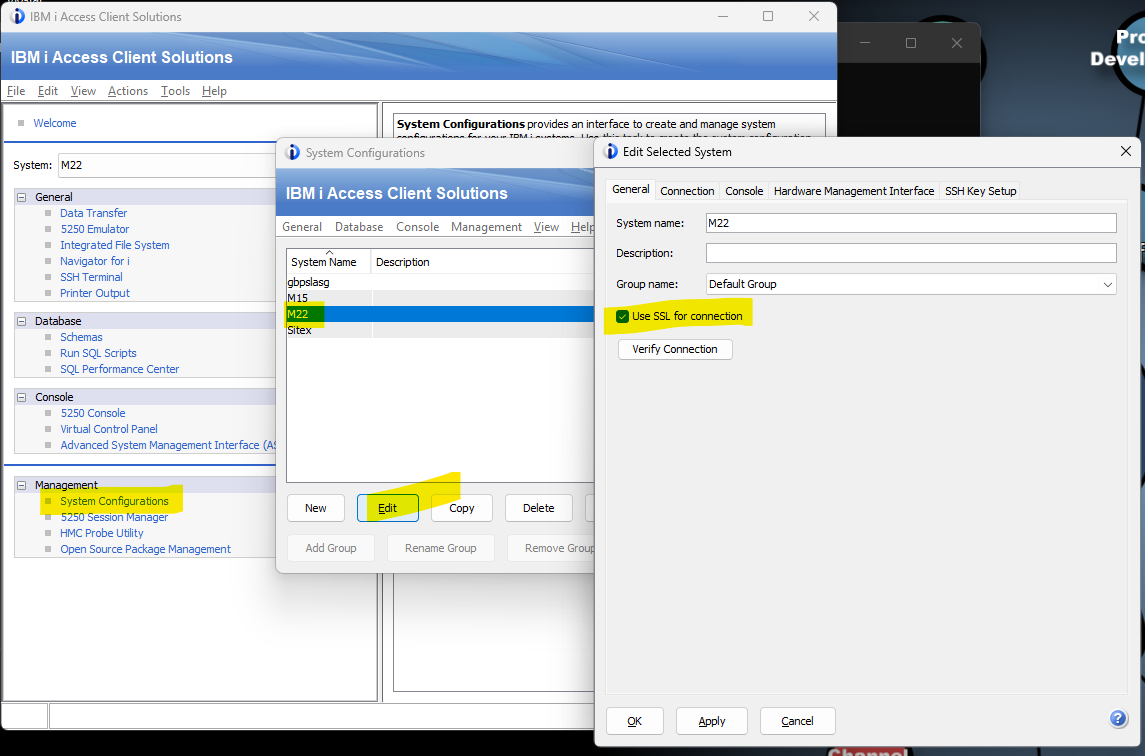
First check your IBM i connection to see if the Use SSL for connection box is ticked or not (to identify ports) e.g.
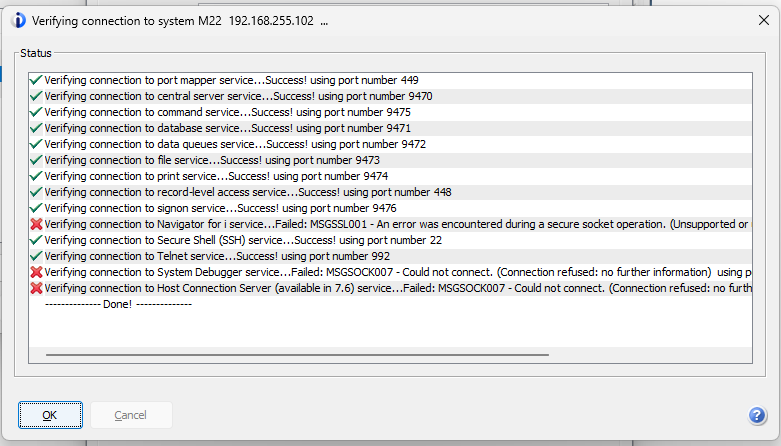
Then use the Verify Connection to test whether the ports can be accessed e.g.
Test Connection to an IBM i Port using TELNET
In the following examples please replace <server_address> with the DNS Name or IP Address of your IBM i.
•Open a Command Prompt on your PC.
Port not open scenario
Enter:
telnet <server_address> 3773
Response:
Connecting To <server_address>...Could not open connection to the host, on port 3773: Connect failed
Port open scenario
Enter:
telnet <server_address> 3772
Response:
Accepted - Black screen